

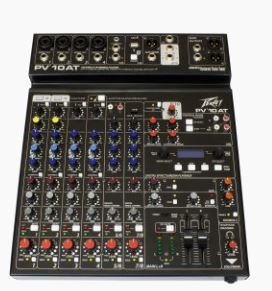
Good sound rarely happens by accident. Behind every clear performance, recording, or broadcast sits a system that blends multiple audio signals into one balanced output. The device responsible for this process is the mixing console. Many beginners find mixers confusing at first because of the many knobs, sliders, and connections spread across the surface.
Still, once you understand the basic ideas behind mixing, the equipment becomes far easier to use. In this blog, you will learn how mixers work, what their main controls do, and how beginners can start using them effectively in small events, rehearsals, or recording setups.
Understanding the Basics of Audio Mixing
Before adjusting knobs or connecting cables, it helps to understand the purpose of a mixer. A mixer gathers several sound sources, such as microphones or instruments, and blends them into one controlled output.
What an Audio Mixer Actually Does
At its core, an audio mixer gathers sound from different sources and combines them into one final signal. This signal usually goes to speakers, headphones, recording equipment, or broadcast systems.
Each channel on the mixer manages a single sound source. One channel may handle a vocal microphone, another might control a guitar, while a third carries the signal from a keyboard or playback device.
Inside the mixer, several stages shape the signal before it reaches the output. Each stage affects how the sound behaves.
Key stages include:
- Input stage – receives the audio signal from microphones or instruments
- Gain control – adjusts the strength of the incoming signal
- Equalization (EQ) – shapes tonal balance by adjusting frequencies
- Channel fader – controls the volume of that specific channel
- Output routing – sends the final signal to speakers or recording systems
These steps work together as a chain. A change in one stage can influence the others. When you learn how these parts interact, the mixer becomes much easier to handle.
Key Components Beginners Should Recognize
Most mixers follow a similar layout. Some models contain more advanced features, yet the main sections usually remain consistent.
Recognizing the basic parts of the mixer helps you work with confidence during setup or live use.
Important mixer components include:
- Input channels – connection points for microphones, instruments, or audio devices
- Gain knob – controls the signal strength entering the mixer
- EQ controls – adjust bass, midrange, and high frequencies
- Auxiliary sends – direct sound to stage monitors or external effects
- Channel faders – determine the volume of each channel in the mix
- Master section – controls the overall output level
Beginners often focus first on the channel faders because they directly affect volume. That approach makes sense. Still, other controls shape the tone and balance of the entire mix.
Once you become familiar with these sections, the mixer’s surface begins to look more organized. The rows of knobs and sliders start to represent clear functions instead of random controls.
Understanding Signal Flow in a Mixer
Signal flow describes the path that sound takes as it moves through the mixer. This concept might appear technical, though it follows a straightforward order.
Sound enters the mixer through an input channel. The signal then passes through several stages before reaching the output. Each stage gives you a chance to adjust the signal.
A simple signal path usually looks like this:
- Input connection – microphone or instrument connects to the mixer
- Gain adjustment – sets the strength of the incoming signal
- Equalization controls – shape the tonal character
- Channel fader – controls the channel’s overall level
- Master output – sends the mixed signal to speakers or recording systems
Understanding this path helps you troubleshoot problems quickly. If a signal disappears or sounds distorted, you can check each stage step by step.
For example, a distorted sound may come from excessive gain rather than the speaker system. Following the signal path helps you find the source of the issue faster.
Setting Up a Basic Mixing System
Beginners often work with smaller setups at first. A rehearsal space, a small venue, or a simple home studio usually involves only a few microphones and instruments.
A basic setup process helps you create a balanced starting point.
Typical setup steps include:
- Connect microphones and instruments to the appropriate input channels
- Set gain levels while performers play or speak at normal levels
- Adjust EQ slightly if certain tones sound too heavy or thin
- Raise channel faders slowly while listening to the overall mix
- Balance levels through the master output
During this stage, listening carefully makes a big difference. Large adjustments often cause problems, while smaller changes usually produce better results.
You may also label channels when multiple sources connect to the mixer. A clear layout makes live adjustments much easier, especially during events.
As you repeat this setup process in different environments, your listening skills begin to guide your decisions.
Conclusion
Mixing audio becomes easier once you understand the purpose behind each control. A mixer brings several sound sources together and shapes them into a clear, balanced output. Over time, simple adjustments in gain, EQ, and channel levels begin to feel natural.
Modern audio mixers now offer powerful tools in compact designs, which makes them accessible for beginners and small setups. When you spend time practicing these basic techniques, your confidence grows with every session. If you plan to improve your sound setup, explore reliable mixing equipment and start experimenting with your own mixes today.
