

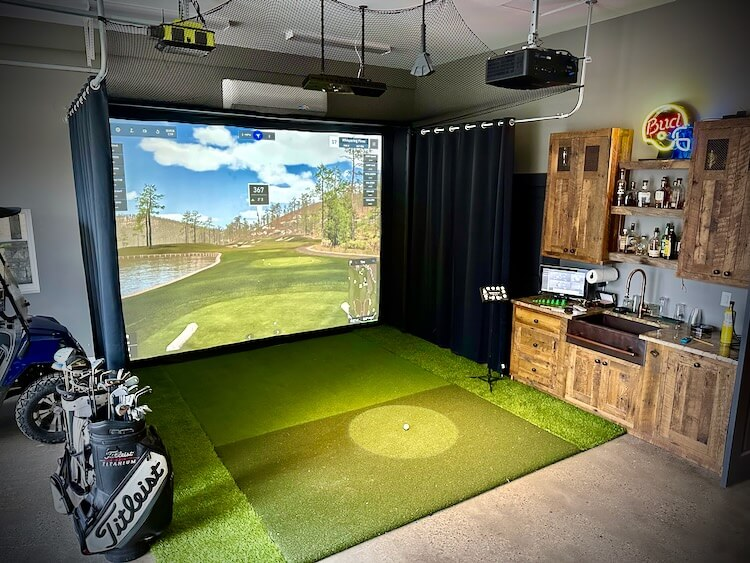
Designing an indoor golf simulator room is an exciting project that blends technology, comfort, and sport into a single immersive environment. Whether you are an avid player seeking consistent practice or someone looking to add a unique recreational space to your home, a well-planned setup can transform how you experience the game. Achieving the ideal configuration requires thoughtful consideration of space, equipment, lighting, acoustics, and overall atmosphere. This guide explores every aspect necessary to create a refined, functional, and enjoyable simulator room without overlooking important details.
Understanding Space Requirements
The foundation of any successful simulator room begins with proper spatial planning. Ceiling height is one of the most critical factors, as unrestricted swing motion demands sufficient vertical clearance. A minimum height of around 9 to 10 feet is generally suitable, though taller dimensions provide added comfort and flexibility, especially when installing a Commercial Golf Simulator designed for professional training environments, entertainment venues, or high-traffic indoor golf facilities. .
Room width should accommodate both right-handed and left-handed players if shared use is anticipated. Depth also plays a significant role, ensuring adequate distance between the hitting area and projection surface. Allowing enough buffer space behind the player enhances safety and prevents accidental damage.
Carefully measuring available dimensions before installation prevents costly adjustments later. Even compact areas can be optimized with creative layout strategies, making efficient use of every inch.
Selecting the Right Simulator Technology
At the heart of the setup lies the simulator system itself. This technology tracks ball movement, swing dynamics, and shot accuracy to replicate real-life play. Choosing a reliable system involves evaluating accuracy, responsiveness, and compatibility with software platforms.
Some systems rely on camera-based tracking, while others use radar or infrared sensors. Each option offers unique advantages, so selecting one that aligns with your practice goals is essential. High-quality systems provide detailed analytics, helping players refine technique and improve performance over time.
Integration with simulation software enhances realism, offering virtual courses, skill challenges, and performance metrics. A smooth interface ensures seamless operation and a more engaging experience.
Designing the Hitting Area
The hitting zone is where performance meets precision. Installing a durable mat that closely mimics natural turf creates a realistic feel while protecting flooring. High-quality mats absorb impact effectively, reducing strain on joints during extended sessions.
Positioning this area correctly ensures accurate data capture. Alignment with sensors or cameras must be precise to avoid inconsistencies. Marking stance guides or using alignment aids can further enhance shot accuracy.
Providing enough space around the hitting zone allows for comfortable movement, preventing restrictions that could interfere with swing mechanics.
Choosing the Ideal Impact Screen
The impact screen acts as both a visual display and a protective barrier. Selecting a strong, high-resolution material ensures longevity and clarity. A well-designed screen absorbs ball impact quietly while delivering sharp visuals for an immersive experience.
Tensioning the screen properly prevents wrinkles and distortions. A smooth surface enhances projection quality, making virtual environments appear more lifelike. Surrounding the screen with protective padding minimizes rebound risk and increases safety.
Investing in a high-quality screen significantly improves both durability and viewing satisfaction.
Optimizing Projector Setup
Projection quality directly influences realism. A high-definition projector with strong brightness ensures clear visuals even in moderately lit conditions. Resolution plays a crucial role in rendering detailed course environments, while brightness determines visibility.
Short-throw projectors are often preferred because they can be placed closer to the screen, reducing shadow interference. Proper mounting—either ceiling or wall—ensures alignment and prevents obstructions during gameplay.
Adjusting aspect ratio and screen size creates a balanced viewing experience. Calibration is essential to maintain accurate proportions and avoid distortion.
Lighting Considerations
Lighting design can dramatically impact the overall atmosphere. Soft, indirect illumination prevents glare on the screen while maintaining visibility throughout the room. Avoid placing bright lights directly in front of the projection surface.
Dimmable fixtures provide flexibility, allowing adjustments based on time of day or activity. Focused lighting near the hitting area ensures players can clearly see the ball without interfering with tracking systems.
Balancing brightness and contrast enhances immersion, making virtual gameplay feel more authentic.
Sound and Acoustics
Acoustic treatment often goes overlooked but plays a significant role in comfort. The sound of ball impact can be loud, especially in enclosed spaces. Installing acoustic panels or padded walls helps absorb noise and reduce echo.
Flooring choices also influence sound levels. Carpeting or rubberized surfaces dampen vibrations, creating a quieter environment. Adding ambient audio systems enhances realism, allowing players to hear course sounds such as wind or crowd reactions.
A well-designed acoustic setup contributes to a more enjoyable and less disruptive experience.
Flooring and Safety Features
Selecting appropriate flooring ensures both safety and durability. Shock-absorbing materials reduce strain and prevent injuries during repeated swings. Non-slip surfaces provide stability, especially during powerful shots.
Protective side barriers or nets prevent stray balls from causing damage. Padding along walls and corners adds an extra layer of security, particularly in compact rooms.
Safety should always be a priority, ensuring that the space remains functional and risk-free for all users.
Ventilation and Climate Control
Maintaining a comfortable environment enhances usability. Indoor practice sessions can become physically demanding, making proper ventilation essential. Installing fans, air conditioning, or air circulation systems helps regulate temperature.
Humidity control is equally important, as excessive moisture can affect equipment and overall comfort. A well-ventilated space keeps players focused and prevents fatigue caused by heat or poor air quality.
Consistent climate conditions also protect electronic components, extending their lifespan.
Storage and Organization
Keeping the simulator room organized improves functionality and aesthetics. Dedicated storage for clubs, balls, and accessories ensures easy access while reducing clutter. Wall-mounted racks or cabinets can efficiently utilize vertical space.
Cable management is another crucial aspect. Concealing wires prevents tripping hazards and creates a clean, professional appearance. Organized setups not only look better but also enhance usability.
Efficient storage solutions contribute to a seamless and enjoyable practice environment.
Seating and Comfort
Adding comfortable seating transforms the room into a social space. Whether for relaxation between shots or hosting friends, seating arrangements enhance overall enjoyment. Options such as lounge chairs, stools, or compact sofas can be tailored to available space.
Positioning seating areas strategically ensures they do not interfere with gameplay. Providing a clear view of the screen allows spectators to enjoy the simulation as well.
Comfortable surroundings encourage longer sessions and make the room more inviting.
Personalizing the Environment
Customization adds character and makes the space uniquely yours. Decorative elements such as framed course images, themed colors, or subtle design accents create a cohesive look. Incorporating personal touches enhances motivation and enjoyment.
Technology can also be integrated creatively. Smart controls for lighting, sound, and climate allow easy adjustments with minimal effort. Personalized settings make the room adaptable to different moods and activities.
A thoughtfully designed environment reflects individual style while maintaining functionality.
Budget Planning and Cost Management
Creating a simulator room involves varying levels of investment. Establishing a clear budget helps prioritize essential components while avoiding unnecessary expenses. High-quality core equipment should take precedence, as it directly affects performance. Understanding the overall Golf Simulator Price is also important, as costs can vary depending on technology features, screen quality, tracking systems, and room customization requirements.
Balancing cost with quality ensures long-term satisfaction. While premium options offer advanced features, mid-range alternatives can still deliver excellent results when chosen carefully.
Planning expenses in advance prevents overspending and allows for gradual upgrades over time.
Maintenance and Upkeep
Regular maintenance keeps the simulator room in optimal condition. Cleaning the screen, mat, and equipment prevents wear and ensures consistent performance. Inspecting components periodically helps identify potential issues early.
Replacing worn-out parts such as hitting mats or protective padding maintains safety and functionality. Software updates should also be performed to keep systems running smoothly.
Consistent upkeep extends the lifespan of the setup and preserves the overall experience.
Enhancing Realism and Practice Efficiency
To maximize the benefits of an indoor simulator, focus on creating a realistic practice environment. Using high-quality visuals, accurate data tracking, and immersive sound design enhances the sense of being on an actual course.
Incorporating practice routines, skill challenges, and performance tracking tools helps players improve steadily. Consistency is key, and having a dedicated indoor space encourages regular training regardless of weather conditions.
A well-designed room not only entertains but also supports meaningful skill development.
Future-Proofing the Setup
Technology continues to evolve, making it wise to design a flexible setup. Choosing equipment with upgrade options ensures compatibility with future advancements. Modular designs allow easy replacement or addition of components without major renovations.
Planning for future improvements saves time and resources in the long run. A forward-thinking approach ensures that the simulator room remains relevant and functional for years to come.
Conclusion
Creating the perfect indoor golf simulator room involves more than simply installing equipment. It requires a balanced approach that considers space, technology, comfort, safety, and personalization. Each element contributes to an immersive environment that enhances both enjoyment and performance.
By carefully planning every detail—from room dimensions to lighting, acoustics, and organization—you can build a space that replicates the excitement of outdoor play while offering the convenience of indoor practice. With thoughtful design and regular maintenance, your simulator room can become a valuable retreat for relaxation, training, and entertainment.
