

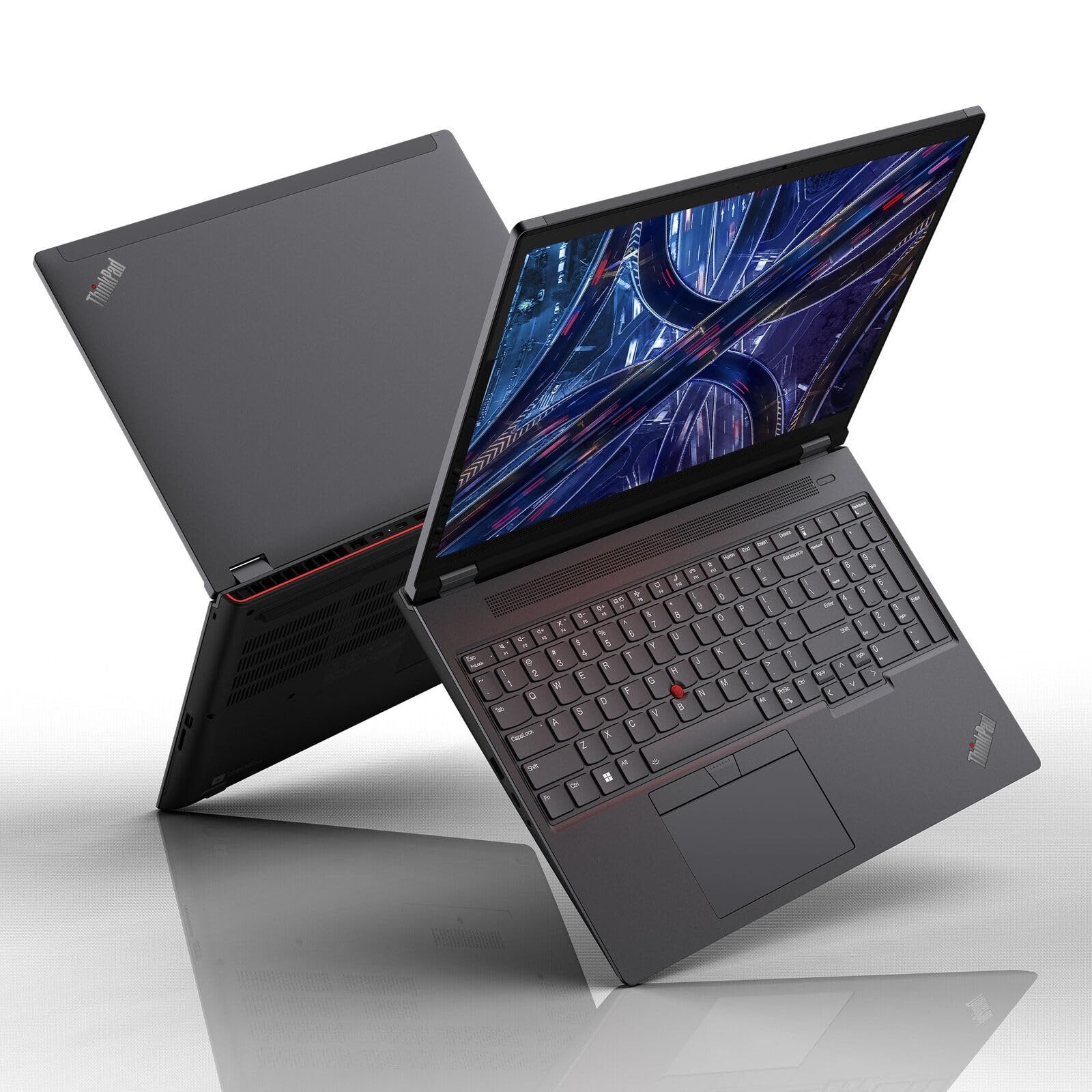
Lenovo P16 Gen 2: The Mobile Workstation Built for Serious Work
If your job revolves around CAD models, 3D renders, massive datasets, or video timelines that bring lesser laptops to their knees, you already know that not every “powerful” laptop actually delivers. The Lenovo P16 Gen 2 officially the Lenovo ThinkPad P16 Gen 2 is Lenovo’s answer to professionals who need genuine desktop-replacement muscle in a portable (if hefty) shell.
In this guide, you’ll learn exactly what the Lenovo P16 Gen 2 offers in terms of performance, display quality, build, battery life, and price, how it compares to a rival like the Dell Precision 5690, and whether it’s the right investment for your workflow. We’ll also touch on how it stacks up conceptually against a bigger sibling in Dell’s lineup, the Dell Precision 7780, for readers weighing a 17-inch alternative.
What Is the Lenovo P16 Gen 2?
The Lenovo P16 Gen 2 is Lenovo’s flagship 16-inch mobile workstation, sitting at the top of the ThinkPad P-series lineup. It replaces the original ThinkPad P16 Gen 1 and is built for engineers, architects, video editors, data scientists, and 3D artists who need workstation-class certification and horsepower without being tied to a desk.
Unlike consumer laptops that prioritize thinness and battery life, the P16 Gen 2 is unapologetically built around performance. It’s thick, heavy, and loud under load and that’s by design. Lenovo engineered this machine to pass ISV (Independent Software Vendor) certification for professional applications like AutoCAD, SolidWorks, and Autodesk Maya, meaning it’s been validated for stability under the exact workloads professionals depend on daily.
Lenovo P16 Gen 2 Specs Overview
Here’s a breakdown of what you can configure into the Lenovo P16 Gen 2:
Processor Options
The laptop ships with 13th and 14th Gen Intel Core HX-series processors, topping out around the Core i9-13980HX or the refreshed Core i7-14700HX in later revisions. These are desktop-class mobile chips built for sustained multi-threaded workloads rather than short bursts of speed.
Graphics
This is where the P16 Gen 2 truly separates itself from thinner “creator” laptops. Graphics options range from the entry-level Nvidia RTX 1000 Ada all the way to the RTX 5000 Ada Generation GPU, with some configurations offering a 130W TGP RTX 4000 Ada that ranks among the fastest mobile GPUs available in a 16-inch chassis.
Memory and Storage
You can configure the P16 Gen 2 with up to 192GB of DDR5 RAM and up to 8TB of SSD storage across dual drive bays. That kind of headroom is essential for handling large simulation datasets, 8K video timelines, or memory-hungry 3D scenes without slowdown.
Display Choices
Lenovo offers four 16-inch, 16:10 panel options:
- FHD+ (1920 x 1200) IPS
- QHD+ (2560 x 1600) IPS at up to 165Hz
- 4K+ (3840 x 2400) IPS
- 4K+ OLED
Professionals doing color-critical work will likely lean toward the 4K+ panels, while the QHD+ 165Hz option appeals to those who also want smooth motion for occasional gaming or fast-paced 3D navigation.
Build and Design
The chassis blends a magnesium-aluminum construction with Lenovo’s classic Storm Grey ThinkPad aesthetic the red TrackPoint nub and full-size keyboard with numpad are still present. It’s a rugged, MIL-SPEC-tested design, but that durability comes at a cost: the laptop weighs in around 6.5 pounds and measures roughly 1.2 inches thick, making it noticeably larger than most gaming laptops in the same screen class.
Lenovo has also leaned into sustainability here, incorporating recycled aluminum, recycled magnesium, and post-consumer plastics throughout the build, along with plastic-free packaging.
Ports and Connectivity
Connectivity is generous: two Thunderbolt 4 ports, a 10Gbps USB-C port, two USB-A ports, HDMI 2.1, a 3.5mm audio jack, and optional SD card and SmartCard readers. Wi-Fi 6E and Bluetooth 5.3 come standard, with 4G WWAN available as an add-on. Notably, several ports are positioned on the rear of the chassis, which helps keep desk cables tidy.
Real-World Performance: What the Benchmarks Show
Independent testing paints a clear picture: the Lenovo P16 Gen 2 is built for GPU-heavy, rendering-focused work.
In SPECviewperf and OctaneBench testing, review outlets found the P16 Gen 2 consistently outperformed rival workstations in 3D rendering and OpenCL-based tasks, largely thanks to its high-wattage RTX Ada graphics options. In CPU-bound workloads, however, some HX-series competitors from HP’s ZBook lineup edged it out slightly, showing that the P16 Gen 2’s real strength lies in GPU-accelerated pipelines rather than raw CPU throughput alone.
The trade-off for that performance is thermals and noise. Reviewers note that the fans get loud under sustained load, and the top-tier 130W GPU configuration can throttle by roughly 10% after several minutes of heavy stress a sign the cooling system, while capable, has its limits when pushed to the maximum for extended periods.
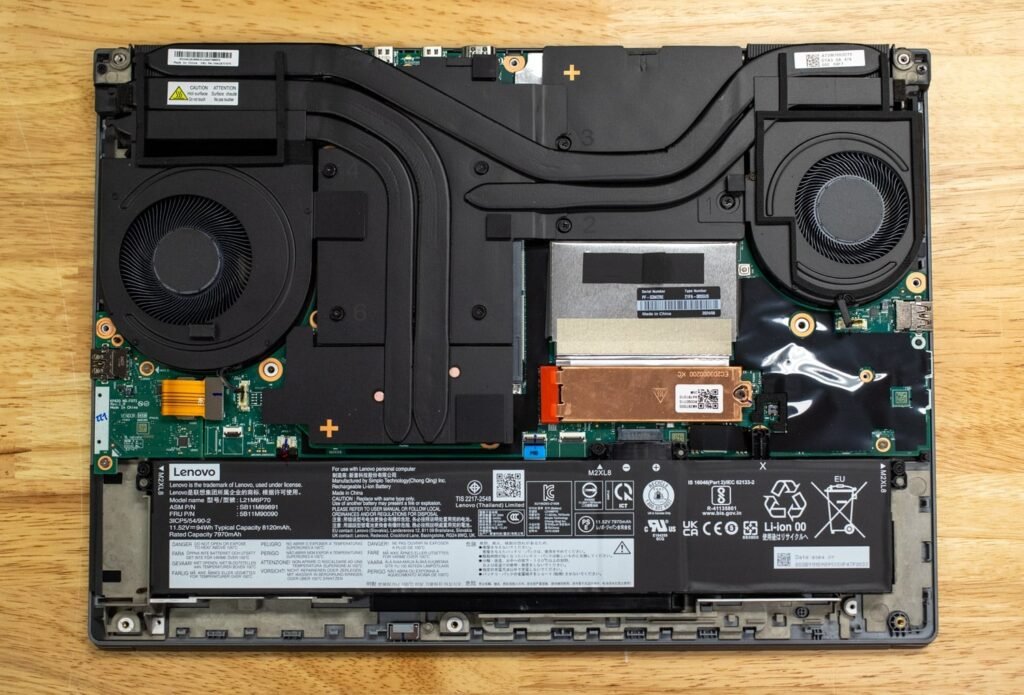
Battery Life: Plan to Stay Plugged In
This is not a laptop you buy for all-day battery life. Under light use you might squeeze out a few hours, but demanding workloads will drain the battery quickly. Most owners treat the P16 Gen 2 as a desktop replacement that occasionally travels between office, studio, or job site not a machine you’d want to rely on unplugged for a full workday.
Pricing: What You’ll Actually Pay
Lenovo’s entry configuration starts in the $1,800–$2,600 range, but that base model is fairly modest. Once you start adding higher-tier RTX Ada graphics, more RAM, and a sharper display, pricing climbs quickly fully loaded configurations with the RTX 4000 Ada or RTX 5000 Ada GPU can run well past $5,000.
That price tag reflects the ISV certification, build quality, and professional-grade components rather than typical consumer laptop pricing. If your work doesn’t strictly require that certification, a gaming laptop with similar raw specs could save you money but you’d lose the enterprise support, upgradeability, and application-level stability Lenovo guarantees.
Lenovo P16 Gen 2 vs. Dell Precision 5690
If you’re cross-shopping mobile workstations, the Dell Precision 5690 is one of the most natural comparisons though it takes a notably different approach.
Design philosophy: The Precision 5690 is Dell’s thin-and-light workstation play, built around Intel’s Core Ultra (“Meteor Lake”) processors rather than the desktop-class HX chips in the P16 Gen 2. It’s noticeably lighter and slimmer, making it more travel-friendly, but that also caps its sustained performance ceiling compared to the Lenovo.
Processing power: The Precision 5690 tops out with a Core Ultra 9 185H, a 45W chip that prioritizes efficiency and integrated AI acceleration (Intel’s AI Boost NPU) over the brute-force multi-core performance of the P16 Gen 2’s HX-series options. In CPU-heavy benchmarking, some reviewers found the Ultra 9 185H didn’t offer a dramatic leap over its own predecessor, whereas the P16 Gen 2’s HX chips post noticeably higher multi-core scores.
Graphics: Both laptops offer Nvidia RTX Ada graphics up to the RTX 5000 Ada tier, so top-end GPU performance is comparable. However, the P16 Gen 2’s cooling system and thicker chassis give it more sustained thermal headroom under prolonged GPU loads.
Portability and battery life: This is where the Precision 5690 pulls ahead. Its thinner, lighter chassis and Meteor Lake efficiency give it a meaningfully longer battery life, making it a better fit for professionals who travel frequently or work away from a power outlet.
Bottom line: Choose the Lenovo P16 Gen 2 if raw, sustained performance is your top priority and portability is secondary. Choose the Dell Precision 5690 if you want workstation-grade certification in a lighter, more travel-friendly package and can accept a slightly lower CPU performance ceiling.
A Quick Note on the Dell Precision 7780
For readers considering an even larger alternative, Dell’s Precision 7780 is worth a mention. As a 17-inch workstation, it takes the same desktop-replacement philosophy as the Lenovo P16 Gen 2 HX-class processors, high-wattage Nvidia RTX Ada graphics, and extensive RAM and storage headroom but in an even bigger chassis with room for additional cooling and expansion. It’s a fair comparison point for buyers who find the 16-inch P16 Gen 2 still too compact for their workflow, though it sacrifices even more portability in the process.
It’s also worth knowing that Dell has been transitioning its Precision workstation branding toward the newer “Pro Max” lineup, so buyers researching Dell options should confirm current model availability before purchasing.
Who Should Buy the Lenovo P16 Gen 2?
Pros
- Class-leading GPU performance with up to RTX 5000 Ada graphics
- Up to 192GB RAM and 8TB storage for serious multitasking and large files
- ISV-certified for professional CAD, engineering, and creative software
- Excellent ThinkPad keyboard and durable build quality
- Strong port selection, including dual Thunderbolt 4
- Sustainable materials and eco-conscious packaging
Cons
- Heavy and bulky not ideal for frequent travel
- Short battery life under demanding workloads
- Fans get loud, and the top GPU option can throttle under sustained stress
- Premium pricing, especially in higher-end configurations
- Factory display calibration isn’t always accurate out of the box
Frequently Asked Questions
Is the Lenovo P16 Gen 2 good for video editing? Yes. With RTX Ada graphics options and support for high-resolution 4K+ displays, it handles demanding video timelines and color-critical work well, especially when configured with a higher-tier GPU.
How does the Lenovo P16 Gen 2 compare to a gaming laptop? It offers similar or greater raw GPU power to many gaming laptops, but with the added benefit of ISV certification and enterprise support features gaming laptops typically lack. However, a comparable gaming laptop can sometimes be cheaper if certification isn’t a requirement.
Can I upgrade the RAM and storage later? Yes, unlike many thin workstations with soldered memory, the P16 Gen 2 supports user-upgradeable DDR5 RAM and dual SSD bays, making it more future-proof over time.
Is the Dell Precision 5690 a better choice than the Lenovo P16 Gen 2? It depends on your priorities. The Precision 5690 is lighter and more portable with better battery life, while the P16 Gen 2 delivers stronger sustained CPU and GPU performance for heavier workloads.
Final Verdict
The Lenovo P16 Gen 2 isn’t trying to be everything to everyone it’s a purpose-built tool for professionals who need serious, sustained performance in a laptop form factor. If you regularly render 3D scenes, run simulations, or edit high-resolution video, its combination of powerful HX-series CPUs, high-wattage RTX Ada graphics, and generous upgrade headroom make it one of the most capable 16-inch workstations available today. Just be prepared for its weight, fan noise, and premium price tag.
If portability and battery life matter more to you than absolute peak performance, the Dell Precision 5690 remains a strong alternative worth considering.
Have you used the Lenovo P16 Gen 2 or a competing workstation like the Dell Precision 5690 for your own projects? Share your experience in the comments below, and pass this guide along to a colleague who’s shopping for their next mobile workstation.
