

Overview of Copyright Registration Certificate
A copyright certificate is an official document issued by the Copyright Office after successful registration of an artistic or creative work. It ensures complete protection by giving ownership rights to the applicant that can be used as legal proof in the case of any disputes or unauthorized access.
In the earlier time, applicants needed to visit the Copyright Office physically for all processes but now the entire process has become digital with the help of online copyright registration service.
Now, creators can easily apply online for copyright, track their application status and download the copyright certificate through the official portal of the copyright office. The online process is made easy so that authors, designers, software developers, musicians, individuals or businesses can register from anywhere.
In this article we explained the step-by-step process to download a copyright certificate online from the official government portal.
How to Download a Copyright Certificate Online?
When your copyright registration application is approved by the copyright authority, the certificate is issued for their intellectual property that can easily download from the official copyright portal. Applicants need to keep the login credentials and diary number to download the certificate.
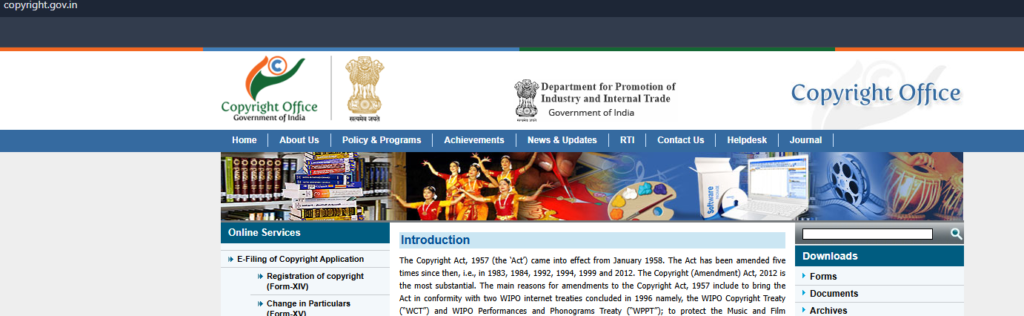
Step 1: Need to visit the Official Copyright Portal
Applicants need to open the official Government portal i.e. https://copyright.gov.in/ to download the copyright certificate.
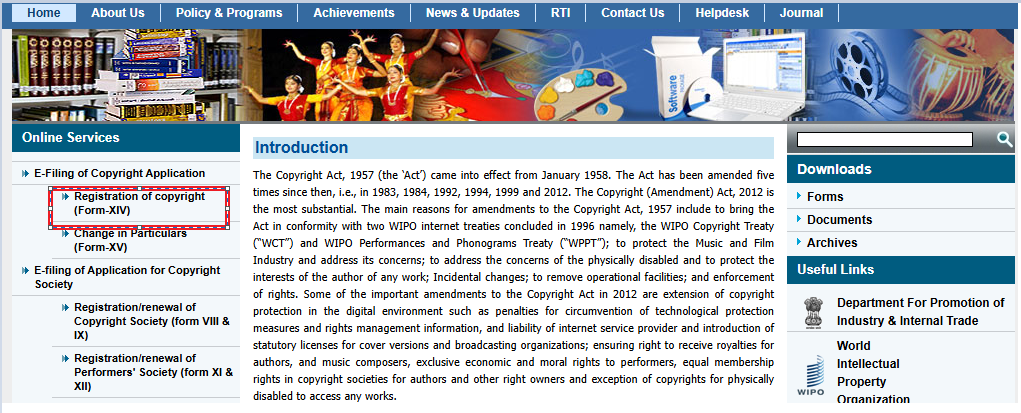
Step 2: Need to click on Registration of copyright option
To go to the login page, users need to click on registration of the copyright option as shown in image.
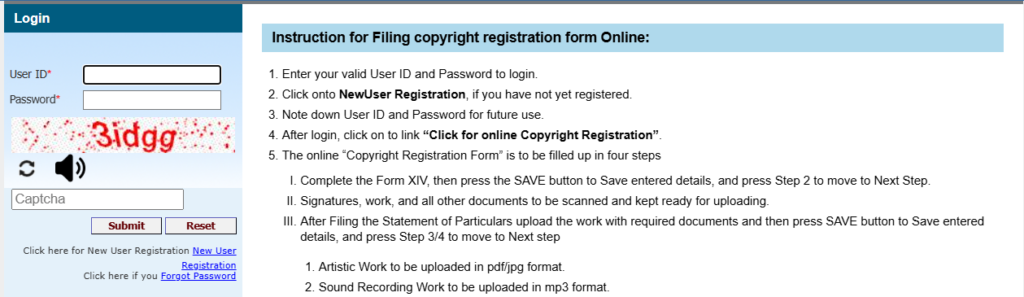
Step 3: Login Using Registered User Credentials
To login, applicants need to enter “User Id” and “Password” and enter captcha and then click on the Submit button.
Step 4: Login to User Home Page
Once the user login, the home page includes all the information regarding copyright applications. Users need to look for a section that displays your submitted applications or approved works.
If the copyright application is fully approved by authority, the status will display as “Registered”.
Step 5: Download the Copyright Certificate
Users need to look for approved applications and then click on the “Download Certificate” or “Generate Registration Number” option to go to the next step.
Step 6: Get Official E-Certificate
Now the portal will generate an official e-certificate with digital signature and a secure QR code.
Step 7: Print or Save the PDF file
For future reference, users can click on save to download the copyright certificate in PDF form.
Important Details to Check After Downloading
After downloading the certificate, users need to carefully check the mentioned details on the certificate such as,
Information of Applicant
Check the applicant name is correct as mentioned in the submitted application.
Registration Number
Check the registration number because it can be used for reference and legal process in future.
Work Title
Ensure the title of copyrighted work is correct and accurate.
Registration Date
The issued certificate also contains the official registration approval date.
If any information is not correct, applicants need to connect with the support section to rectify the errors.
Common Problems Arise During Downloading Certificate
Below are some common problems that can arise during the process of downloading certificates.
Not Visible the Download Option
It happens when the application is still in process. Wait for status changes to either be approved or registered.
Wrong Login Credentials
Check the User ID and password at the time of login. If you forgot, reset the password.
Technical Issues
Due to heavy traffic on Government websites, websites become slow. Need to refresh the page if sites become slow especially during peak hours.
Forget Diary Number
Applicants must save the diary number that they received during the copyright registration online process because it is needed both for tracking and certification.
Tips for Smooth Certificate Download
Following a few simple steps can make the process easier and faster.
Why It Is Useful to Download Online Copyright Certificate
With the online process, the copyright process becomes easy for applicants in India. It is useful to download the copyright certificate. Some of the points where online copyright certificate is helpful are:
- Legal Proof of Ownership Rights
- Get Official Creation Date to stop others from claiming your registered work
- Give Opportunity to quickly remove the stolen content from your websites or digital platforms.
Note: If you need professional help for filing different types of intellectual property rights can easily file from IPR INDIA ONLINE private portal.
Conclusion
Downloading a copyright certificate online is now a simple process through the official government portal. After completing copyright registration online, applicants can log into their accounts, check approval status, and download the certificate in PDF format within minutes.
By following the correct steps, users can easily access their registration documents without visiting any office. Creators who regularly apply online for copyright should always keep their login credentials and diary numbers secure for smooth certificate access in the future.