

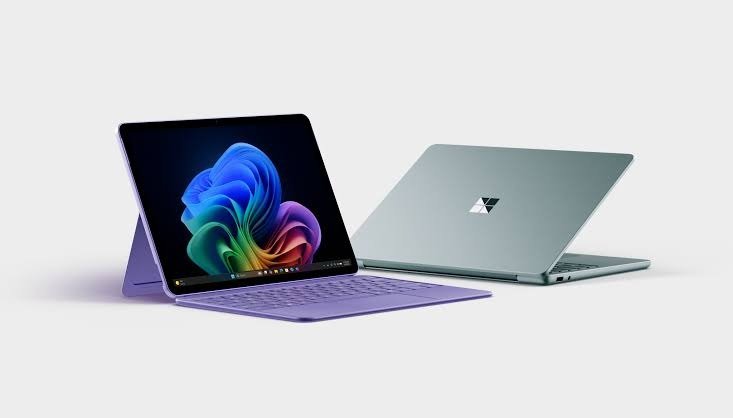
If you’ve been shopping for a new laptop-tablet hybrid, chances are the Microsoft Surface Pro has already crossed your radar. It’s one of the most recognizable 2-in-1 devices on the market, and the latest 12th Edition brings a genuinely meaningful set of upgrades rather than just a spec bump. In this guide, we’ll walk through what’s new, how it stacks up against the Microsoft Surface Laptop, and whether it deserves a spot in your bag or on your desk next to a workstation-class machine like the Dell Precision 5690.
By the end of this article, you’ll know exactly which Surface Pro configuration fits your workflow, what tradeoffs to expect, and how to decide between the tablet-first Surface Pro and the more traditional clamshell Surface Laptop.
What Is the Microsoft Surface Pro?
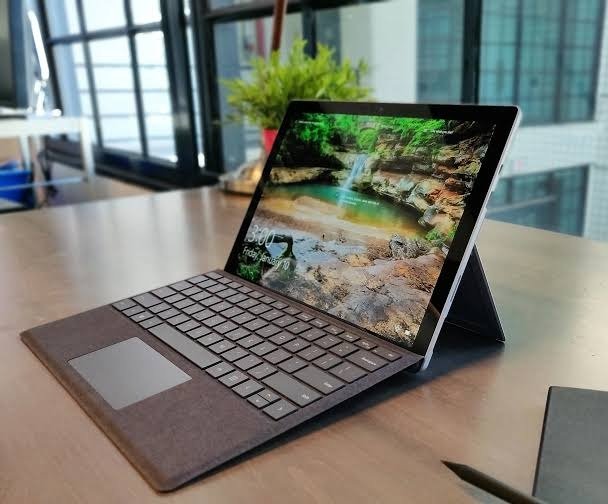
The Surface Pro is Microsoft’s flagship 2-in-1 device, a tablet with a built-in kickstand that transforms into a full laptop when paired with a detachable keyboard. It’s designed for people who move between tasks that suit a touchscreen (sketching, note-taking, reading) and tasks that need a physical keyboard and trackpad (writing, spreadsheets, coding).
The Microsoft Surface Pro 2026, officially the 12th Edition, launched on June 16, 2026, and is available to order through the Microsoft Store. It comes in two body sizes and two very different chip platforms, which is the first thing shoppers need to understand before comparing prices.
Two Versions, One Name: 12-Inch vs. 13-Inch
Microsoft’s naming can be confusing this generation because there are effectively two distinct product lines sharing the “12th Edition” label.
Surface Pro, 13-inch (12th Edition) Intel-powered
Aimed at business and power users, this model runs on Intel’s newest chips. It ships with Windows 11 Pro, a choice of Intel Core Ultra 5 or X7 (Series 3) processors, Intel AI Boost delivering 50 TOPS of on-device AI performance, optional 5G, Wi-Fi 7, a removable Gen 4 SSD, and a 2880 × 1920 display with an optional OLED panel. The design keeps the same overall look as the previous 13-inch Surface Pro, though the Slim Pen has been updated to support Windows 11’s new haptic feedback system.
Pricing on this Intel business tier starts high. Both the flagship Surface Pro and Surface Laptop now start at $1,949 for a Core Ultra 5 configuration with 16GB of RAM, a jump Microsoft attributes to ongoing component shortages.
Surface Pro, 13-inch (12th Edition) Snapdragon-powered
For consumers, Microsoft also sells a Qualcomm-based version of the 13-inch model. This variant runs on Snapdragon X2 chips, includes Windows 11, pen and touch support, a built-in NPU, Wi-Fi 7, an optional OLED PixelSense display, up to 64GB of memory, and removable SSD storage.
Surface Pro, 12-inch: the smaller, lighter option
If portability matters more than raw power, the 12-inch model is the one to look at. It runs on Qualcomm Snapdragon X Plus (8-core) processors and offers touchscreen support with all-day battery life, and buyers can choose 8GB of RAM for everyday browsing and productivity or step up to 16GB for smoother multitasking and Copilot+ PC features. Note that the 12-inch model uses its own dedicated keyboard accessory; the Surface Pro 13-inch Keyboard and Flex Keyboard are not compatible with it.
What’s Actually New This Generation
It’s easy to assume an annual refresh is just faster silicon, but this cycle brings several changes worth calling out.
A genuinely faster chip. The headline upgrade on the Snapdragon side is the new Snapdragon X2 Elite, a 12-core processor that delivers up to 50% more overall performance than the Snapdragon X Elite in the previous Surface Pro, and Microsoft positions it as outperforming Apple’s M5 chip in the current iPad Pro lineup.
A much stronger NPU. The Hexagon NPU inside the new Surface Pro delivers 80 TOPS of AI processing power, a significant jump from the 45 TOPS supported by the previous 13-inch model, which means on-device AI features such as Copilot, live captions, and image generation run faster and more efficiently.
OLED, finally. For the first time, the Surface Pro offers an OLED display option on higher-end configurations, sitting alongside the standard LCD panel on base models.
Better battery life. Microsoft rates the new Surface Pro at up to 15.5 hours of local video playback, more than 10% longer than the previous generation.
More memory headroom on the Intel side. The Intel-based Surface Pro 12 configures with a Core Ultra 5 335 or Core Ultra 7 366H and offers 16GB, 32GB, or 64GB of LPDDR5X RAM though notably, there’s no version with discrete Arc graphics like the one found on the Surface Laptop 8.
Pricing Breakdown
Pricing varies quite a bit depending on which version you’re looking at:
- 12-inch Snapdragon X2 model: starts at $1,499 for the base Snapdragon X2 Plus configuration with 16GB RAM and 256GB storage, with higher-end OLED configurations starting at $1,799.
- 13-inch Intel business model: starts at $1,949 for a Core Ultra 5 configuration with 16GB RAM.
That’s a wide spread, so it pays to match the configuration to your actual needs rather than defaulting to the flagship.
Surface Pro vs. Microsoft Surface Laptop: Which Should You Buy?
This is the question most shoppers actually have. Both devices share the same internal chip platforms this generation, so the decision usually comes down to form factor rather than raw performance.
| Surface Pro | Surface Laptop | |
| Form factor | Detachable tablet + kickstand | Traditional clamshell |
| Best for | Sketching, note-taking, travel, hybrid use | Typing-heavy work, all-day desk use |
| Keyboard | Sold separately, detachable | Built-in |
| Portability | Lighter, more compact as a tablet | Heavier but more stable on a lap |
| Display sizes | 12-inch and 13-inch | 13-inch, 13.8-inch, and 15-inch |
If you spend most of your day typing, writing reports, coding, managing spreadsheets the Surface Laptop’s built-in keyboard and larger trackpad will feel more comfortable for long sessions. If you regularly switch between typing, sketching, note-taking, or presenting, the Surface Pro’s tablet mode earns its keep.
It’s also worth noting that Microsoft launched refreshed versions of both the Surface Pro 13-inch and Surface Laptop lineup (13-inch, 13.8-inch, and 15-inch) on the same day, targeting business customers first, with consumer models following later.
How Does It Compare to a Workstation Laptop Like the Dell Precision 5690?
It’s a fair question if you’re choosing between a 2-in-1 and a mobile workstation. The Dell Precision 5690 is built for a different purpose entirely it targets engineers, 3D designers, and data scientists who need discrete workstation-class graphics and ISV-certified drivers for CAD and simulation software. The Surface Pro, by contrast, is built around portability, touch input, and pen support rather than sustained heavy compute.
If your work involves CAD, video rendering, or GPU-intensive modeling, a Precision-class workstation will outperform any Surface Pro configuration. If your priority is a lightweight, versatile device for writing, browsing, note-taking, and everyday productivity with occasional creative work, the Surface Pro is the more practical and far more portable choice.
Real-World Use Cases
Different professions get real value out of the Surface Pro’s tablet-laptop flexibility:
- Digital artists and illustrators rely on the pen input and 2-in-1 form factor for precise inking and freehand sketching directly on the high-resolution display.
- Architects and technical designers use tablet mode for blueprint markup and design review without needing a separate drawing tablet.
- Field technicians benefit from the optional 5G connectivity and lightweight tablet form for pulling up work orders and reference material on-site.
- Students use the pen and tablet mode for handwritten notes and diagrams during class, then switch to laptop mode for typing essays later.
Pros and Cons
Pros:
- Genuinely faster CPU and NPU performance this generation
- OLED display now available for the first time
- Long battery life, rated up to 15.5 hours of video playback
- Two body sizes to match different portability needs
- Removable SSD storage on most configurations
- Optional 5G for connectivity on the go
Cons:
- Keyboard and Slim Pen are sold separately, adding to the real cost
- Flagship Intel business configuration starts at nearly $2,000
- No discrete graphics option, so it’s not built for GPU-heavy workloads
- 12-inch and 13-inch keyboards aren’t interchangeable
Frequently Asked Questions
Is the Microsoft Surface Pro good for gaming? It can handle light and casual games, but without discrete graphics it isn’t built for demanding titles. For serious gaming, a dedicated gaming laptop is a better fit.
Do I need to buy the keyboard separately? Yes. On most configurations, the Type Cover or Flex Keyboard and the Slim Pen are sold as separate accessories, so factor that into your total budget.
What’s the difference between the 12-inch and 13-inch Surface Pro? The 12-inch model is smaller, lighter, and uses Snapdragon X Plus chips aimed at everyday use, while the 13-inch model offers a larger display, more RAM options, and a choice between Intel and Snapdragon X2 platforms for more demanding workflows.
Should I get the Surface Pro or the Surface Laptop? Choose the Surface Pro if you want tablet flexibility and pen input. Choose the Surface Laptop if you primarily type and want a built-in keyboard and larger trackpad without detaching anything.
Does the Surface Pro support 5G? Yes, optional 5G connectivity is available on select 13-inch configurations, which is useful for fieldwork or travel without relying on Wi-Fi.
Final Thoughts
The Microsoft Surface Pro’s 12th Edition is one of the more substantial updates the lineup has seen in years a noticeably faster chip, a much stronger NPU for on-device AI, an OLED display option, and improved battery life all land in the same generation. Whether it’s the right choice over the Surface Laptop or a workstation like the Dell Precision 5690 really comes down to how you work: if flexibility, pen input, and portability matter more than raw sustained performance, the Surface Pro is hard to beat.
Have you used the new Surface Pro, or are you still deciding between it and the Surface Laptop? Share your thoughts in the comments below, and if you found this guide helpful, pass it along to anyone else weighing a new 2-in-1.
