

Introduction: The Gap Between What Salesforce Does and What Your Business Needs
You bought Salesforce. You implemented it. And now, six months in, your sales team is still working around it — exporting data to spreadsheets, manually copying records between systems, and calling IT every time a workflow breaks.
You’re not alone. According to Salesforce’s own research, over 60% of CRM implementations fail to deliver their intended ROI — not because the platform is flawed, but because most businesses try to force their unique processes into a generic configuration. Off-the-shelf Salesforce is powerful. But your business isn’t off-the-shelf.
That’s the core problem custom Salesforce development solves.
This guide is written for CTOs, operations managers, and B2B decision-makers who are evaluating whether custom Salesforce development is the right investment — and what it actually involves. We’ll cut through the buzzwords, explain exactly what gets built and why, and give you a practical framework for deciding when to customize, how to approach it, and what to expect from a competent development partner.
No fluff. No vague promises. Just a clear-eyed breakdown of how custom Salesforce development works in 2026.
1. What Is Custom Salesforce Development — And What It’s Not
Custom Salesforce development refers to extending the Salesforce platform beyond its out-of-the-box capabilities using code, configuration, and architecture decisions tailored specifically to your organization’s workflows, data model, and business logic.
It is not the same as:
- Salesforce setup: Turning on features, creating fields, building basic reports
- AppExchange installs: Installing pre-built third-party apps from the Salesforce marketplace
- Standard automation: Point-and-click Flow Builder rules that most admins handle
Custom development involves writing actual code — primarily in Apex (Salesforce’s proprietary Java-like language), Lightning Web Components (LWC) for front-end interfaces, and SOQL/SOSL for data queries. It also includes building custom APIs, integrations with external systems, and architecting data models that don’t exist natively in Salesforce.
The spectrum of customization looks like this:
The decision to move from configuration into custom development is significant. It introduces code that needs to be maintained, tested, and deployed through a proper DevOps process. That cost is real — but so is the cost of a CRM that doesn’t match how your team actually works.
Pro Tip: Before committing to custom development, always audit what’s available through Salesforce’s native tools and the AppExchange. Custom code should be the answer when existing tools genuinely can’t meet the requirement — not the first instinct.
2. When Actually Need Custom Salesforce Development?
Most organizations don’t need custom development on day one. But there are clear signals that configuration alone isn’t going to cut it.
Signal 1: Your business logic is too complex for standard automation
If your pricing model has 40 conditional variables, if your contract renewal process depends on data from five different objects, or if your approval chains vary by geography, product line, and deal size simultaneously — Flow Builder will reach its limit. Apex handles complex conditional logic cleanly.
Signal 2: You need real-time integration with external systems
Salesforce’s native connectors work for common platforms (Outlook, Slack, DocuSign). But if you’re connecting to a proprietary ERP, a legacy database, a third-party logistics platform, or any system with a custom API, you’ll need custom integration work — REST/SOAP API callouts built in Apex or middleware like MuleSoft with custom configuration.
Signal 3: Your UI requirements go beyond standard page layouts
Salesforce’s standard record pages work fine for standard use cases. But if your service reps need a unified customer dashboard pulling from five objects, or your field technicians need a mobile-optimized interface with offline capability, you’ll need Lightning Web Components built from scratch.
Signal 4: Your reporting and analytics needs exceed native capabilities
Standard Salesforce reports are powerful but flat. If you need dynamic cross-object rollups, custom KPI dashboards updated in real time, or data visualizations built into the record page itself — that requires custom development.
Signal 5: Your data model doesn’t map to Salesforce’s standard objects
Salesforce is built around Accounts, Contacts, Leads, Opportunities, and Cases. If your business model doesn’t fit neatly into that structure — say you’re a property management firm, a healthcare provider, or a logistics company — custom objects, relationships, and sometimes an entirely rearchitected data model are required.
Real-World Example: A mid-market manufacturing company was using Salesforce for sales but their quoting process lived entirely in Excel. Every quote required a rep to export opportunity data, manually populate a spreadsheet, email it to the customer, and then re-enter data into Salesforce when the deal closed. The fix was a custom LWC quoting tool embedded directly in the Opportunity record, connected to their product catalog via a custom API. Quote generation time dropped from 45 minutes to under 5. Deal velocity increased 22% in the first quarter after launch.
Pro Tip: Document every manual workaround your team currently uses in Salesforce. Each workaround is a customization requirement hiding in plain sight.
3. The Core Components of Custom Salesforce Development
Understanding what actually gets built helps you have smarter conversations with developers and vendors, and make better scope decisions.
Apex Code
Apex is Salesforce’s server-side programming language. It runs on Salesforce’s servers and handles business logic that’s too complex for declarative tools. The most common Apex components are:
- Triggers: Code that fires automatically before or after a record is inserted, updated, or deleted. Used for complex validation, cross-object updates, and cascading business logic.
- Classes and Services: Reusable business logic encapsulated in classes — think of these as the backend services that handle calculations, routing, record creation, and external callouts.
- Batch Apex: Processes large datasets asynchronously — critical for data migrations, scheduled cleanups, and mass updates that would time out in real-time execution.
- Scheduled Apex: Time-triggered jobs — nightly syncs, weekly report generation, automated reminders.
Lightning Web Components (LWC)
LWC is Salesforce’s modern front-end framework for building custom UI components using HTML, JavaScript, and CSS. Any time you see a custom-designed section on a Salesforce page that does something native layouts can’t — it’s almost certainly an LWC. Common uses include dynamic dashboards, embedded calculators, custom data tables, and multi-step forms.
Custom APIs and Integrations
Building a connection between Salesforce and an external system typically involves writing Apex HTTP callout classes that send and receive data via REST or SOAP APIs. The architecture also often includes named credentials for authentication, custom metadata for configuration, and platform events or Change Data Capture for real-time syncing.
Custom Objects and Data Architecture
Salesforce allows you to create entirely custom database objects with custom fields, relationships, and validation rules. For complex businesses, this means architecting a data model that mirrors your actual business entities — not just squeezing everything into standard objects.
Real-World Example
A B2B SaaS company managing hundreds of reseller partnerships found that Salesforce’s standard Account/Contact model couldn’t represent the three-tier relationship structure they needed (Brand → Reseller → End Customer). A custom developer built three new custom objects with appropriate lookup and master-detail relationships, created Apex logic to roll up revenue attribution correctly across all three tiers, and built an LWC hierarchy viewer embedded in every Account record. Their ops team went from spending three days per month reconciling spreadsheets to having real-time revenue attribution in the platform.
Pro Tip: Always design your data model before writing a single line of code. Data architecture decisions are expensive to reverse. A 2-hour whiteboarding session with an architect before development starts can save weeks of rework.
4. The Custom Salesforce Development Process: What to Expect End-to-End
A professional custom Salesforce development engagement follows a disciplined process. If a vendor skips any of these stages, treat it as a red flag.
Stage 1: Discovery and Requirements Mapping (1–2 weeks)
The engagement starts with structured discovery — interviews with stakeholders, process mapping sessions, and an audit of the current Salesforce configuration. The output is a requirements document that translates business needs into technical specifications. Every custom feature should be traceable to a specific business problem.
Stage 2: Solution Architecture (3–5 days)
An architect (not just a developer) designs the solution: data model, component architecture, integration patterns, security model, and scalability considerations. This is where decisions are made about whether to use Apex triggers vs. flows, which integration pattern to use, and how the solution handles edge cases. This stage is often skipped by less experienced partners — and it’s where most technical debt originates.
Stage 3: Development in a Sandbox (2–8 weeks depending on scope)
All development happens in a sandbox environment — never in production. Development should follow Salesforce best practices: bulkified triggers, proper governor limit management, separation of concerns, and comprehensive unit test coverage (Salesforce requires 75% minimum; professional shops target 85–90%).
Stage 4: Quality Assurance and UAT (1–2 weeks)
QA includes both automated testing and manual user acceptance testing (UAT) with actual end users. This stage frequently surfaces requirements that weren’t captured in discovery — budget for some scope refinement here.
Stage 5: Deployment and Go-Live
Deployment uses Salesforce’s change set process or, in more mature DevOps setups, a CI/CD pipeline using tools like Gearset, Copado, or SFDX. Production deployment should happen in a planned maintenance window with a rollback plan in place.
Stage 6: Hypercare and Documentation
The first 2–4 weeks post-launch are critical. Real users will find edge cases no one anticipated. A responsible development partner includes a hypercare period for rapid bug fixes. Every engagement should also produce technical documentation — not just for the developers who built it, but for the Salesforce admin who will maintain it.
Real-World Example: An insurance brokerage engaged a development firm that skipped formal discovery and jumped straight to coding. Eight weeks later, they had a working piece of software — for a process that had changed three months earlier. A proper discovery session would have caught that. The client paid for two full iterations. Discovery isn’t overhead; it’s insurance.
Pro Tip: Always run parallel operations — the old process and the new system — for at least two weeks post-launch for any mission-critical workflow. Never flip a switch and assume everything works on day one.
5. Custom Salesforce Integration: Connecting Your Tech Stack
Most mid-market and enterprise businesses don’t run on Salesforce alone. ERP, HRIS, marketing automation, billing, support, and logistics systems all generate and consume data that should live in or sync with Salesforce. Custom integration is often the most high-value work a development team delivers.
Common Integration Patterns
Real-time API integration: Salesforce makes outbound calls to external systems or receives inbound calls via Salesforce’s REST API. Ideal for transactions where data freshness is critical — stock levels, customer credit status, real-time pricing.
Batch/scheduled sync: Data moves between systems on a schedule (hourly, nightly). Lower complexity, appropriate when real-time is unnecessary — syncing closed deal data to an ERP, for example.
Event-driven integration: Salesforce Platform Events or Change Data Capture triggers actions in external systems when records change. Useful for decoupled architectures where you don’t want tight API dependencies.
Middleware platforms: MuleSoft (Salesforce-owned), Boomi, Informatica, and Make (formerly Integromat) sit between systems and handle transformation, routing, and error handling. Often the right answer when you have many systems to connect.
The Hidden Complexity of Integration
Integrations are rarely as simple as “connect System A to System B.” The real work is in:
- Data mapping: Field A in your ERP doesn’t always mean the same thing as Field A in Salesforce
- Error handling: What happens when the external system is down? When a record fails to sync?
- Duplicate management: Are you creating duplicate records when data flows in from multiple sources?
- Security: Are you handling authentication (OAuth, API keys) correctly? Is sensitive data encrypted in transit?
Real-World Example: A logistics company integrated Salesforce with their custom-built warehouse management system (WMS). Every time a sales rep created an order in Salesforce, it needed to flow to the WMS for fulfillment, and status updates needed to flow back. The integration used a combination of Apex callouts for the outbound order creation and a scheduled batch job for the inbound status sync. When the WMS went down for maintenance, a dead-letter queue held failed messages and replayed them on reconnection. The sales team got real-time order status in Salesforce without IT involvement.
Pro Tip: Build integration with failure in mind, not success. Document every failure mode — what happens when the external API is down, when it returns an unexpected response, when a required field is null. Error handling in integrations is not optional; it’s the majority of the real engineering work.
6. Cost, Timeline, and ROI: The Numbers Decision-Makers Actually Need
Custom Salesforce development is not cheap. That’s not a reason to avoid it — but it is a reason to approach it with clear expectations and a rigorous business case.
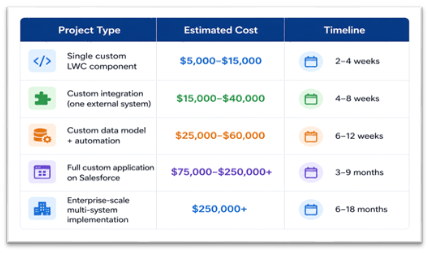
Typical Cost Ranges (2026)
These are ranges, not quotes. Final cost depends on complexity, the partner’s rate card (onshore vs. offshore vs. hybrid), and whether your existing org is clean or needs remediation first.
How to Build the Business Case
The ROI of custom Salesforce development typically comes from four levers:
- Labor savings: How many hours per week does your team spend on manual workarounds? Multiply by fully loaded employee cost. That’s your baseline.
- Revenue impact: Does faster quoting, better lead routing, or tighter pipeline visibility lead to more closed deals or larger deal sizes?
- Error reduction: What’s the cost of data entry errors, missed follow-ups, or compliance failures under the current state?
- Scalability: Can you grow headcount without proportionally growing operational overhead? Custom automation is often the answer.
Real-World Example: A professional services firm calculated that their account managers spent an average of 6 hours per week on manual Salesforce data entry and reporting tasks that a custom automation package could eliminate. At a fully loaded cost of $85/hour and 12 account managers, that was $267,840 in annual labor cost. The custom development project cost $68,000. Payback period: under 3 months.
Pro Tip: Don’t evaluate custom development on cost alone — evaluate it on cost relative to the status quo. The spreadsheet-and-email workaround your team uses isn’t free. It has a real cost that rarely shows up in a budget line.
7. Choosing the Right Custom Salesforce Development Partner
The Salesforce ecosystem is enormous, with thousands of partners ranging from solo developers to global SIs. Choosing the wrong one is one of the most expensive mistakes a company can make.
Learn more : salesforce custom development
What to Look For
Salesforce certifications: Relevant certifications include Salesforce Certified Platform Developer I and II, Application Architect, System Architect, and Technical Architect. These aren’t just vanity credentials — they reflect real platform knowledge tested against Salesforce’s standards.
Demonstrated industry experience: A partner who has built custom solutions in your specific industry understands the data models, compliance requirements, and common integration challenges you’ll face. Ask for references from companies in your sector, not just generic case studies.
A defined development methodology: Any serious partner should be able to walk you through their discovery process, architecture review process, testing standards, and deployment methodology. Vague answers here are disqualifying.
Code quality practices: Ask how they handle governor limits, how they write test classes, and whether they use version control (Git) and a CI/CD pipeline. If they deploy directly to production from a sandbox with change sets and no source control, you will have problems.
Post-launch support model: Custom code needs ongoing maintenance. Salesforce releases three major updates per year (Spring, Summer, Winter), and deprecated features or API changes can break custom code. Understand what the support model looks like before you sign.
Questions to Ask Every Vendor
- Can you walk me through a project where the original scope changed significantly during development — and how you handled it?
- What does your technical architecture review process look like?
- Who will actually be working on my project — and what are their certifications?
- How do you handle knowledge transfer so our internal team isn’t dependent on you forever?
- What’s your approach to documentation?
Real-World Example: A financial services firm chose a large offshore development firm based on price. The project was delivered three months late, test coverage was at the 75% minimum with low-quality tests, and zero documentation was produced. Two years later, they couldn’t find a developer willing to maintain the codebase — because no one could understand it. They ultimately paid 60% of the original project cost to have a different firm audit and document the existing code before any new work could proceed.
Pro Tip: Ask to review code samples or a technical architecture document from a previous project before signing. A partner who does quality work is proud to show it. A partner who won’t show it is hiding something.
8. Maintaining and Scaling Custom Salesforce Development Over Time
Building custom Salesforce solutions is not a one-time event. The platform evolves, your business evolves, and your custom code needs to keep pace with both.
Salesforce’s Three Annual Releases
Salesforce releases major platform updates three times per year. Most updates are additive, but some deprecate older APIs or change behavior in ways that affect custom code. Every organization running custom development should:
- Activate preview sandboxes before each release to test custom code against the new version
- Maintain a release testing checklist for critical custom workflows
- Subscribe to Salesforce’s release notes and trust.salesforce.com
Managing Technical Debt
Technical debt in Salesforce accumulates in predictable ways: undocumented triggers, hardcoded IDs, test classes that exist only to hit coverage requirements, and integrations built without error handling. Left unmanaged, it makes every subsequent change slower and riskier.
A responsible development partner schedules periodic technical health checks — a code review and architecture audit once or twice per year — to identify debt before it becomes a crisis.
Scaling Your Salesforce Architecture
What works for 50 users often doesn’t work for 500. As your organization grows, common scaling challenges include:
- Governor limits: Salesforce enforces hard limits on query rows, CPU time, and DML operations per transaction. Poorly written code that works fine at low volume hits these limits at scale.
- Org complexity: More customizations mean more interactions between components, more testing requirements, and more risk from each change.
- Data volume: Salesforce performs differently with millions of records. Proper indexing, archiving strategies, and query optimization become critical.
Real-World Example: A SaaS company that grew from 80 to 400 employees over two years found that their custom lead routing trigger — which worked perfectly at low volume — was hitting CPU governor limits during peak inbound periods as marketing scaled up campaigns. The fix required rewriting the trigger to use asynchronous Apex (Queueable) and restructuring the routing logic. It was a two-week engagement that could have been avoided with better initial architecture. Their new development partner now includes a scalability review in every architecture document.
Pro Tip: Design for 5–10x your current volume from the start. Retrofitting scalability into Apex code is significantly more expensive than building it in correctly the first time.
Conclusion: Custom Salesforce Development Is an Investment, Not an Expense
The companies that get the most out of Salesforce are not the ones who accepted the platform as it came out of the box. They’re the ones who recognized that their business processes are a competitive advantage — and invested in technology that reflects and reinforces those processes, rather than forcing their teams to adapt to generic software.
Custom Salesforce development, done right, delivers:
- Workflows that mirror how your team actually operates
- Integrations that eliminate manual data movement between systems
- Interfaces that give your people the information they need, in the format they need it
- A scalable data architecture that grows with your business
It requires a real investment — in time, money, and organizational engagement. It requires a capable development partner with genuine platform expertise. And it requires clear business requirements before a single line of code is written.
But for any B2B organization that has outgrown out-of-the-box Salesforce, the alternative — a CRM your team works around instead of in — costs far more in the long run.
Ready to Build a Salesforce Solution That Actually Fits Your Business?
If you’ve read this far, you’re either dealing with a Salesforce implementation that isn’t delivering, or you’re trying to get it right from the start. Either way, the next step is a conversation.
We offer a free 45-minute Salesforce consultation for B2B decision-makers evaluating custom development. In that session, we’ll:
- Review your current Salesforce configuration and identify the highest-leverage customization opportunities
- Give you an honest assessment of what’s achievable through configuration vs. what genuinely requires custom code
- Outline a realistic scope, timeline, and cost range for your top priority — no obligation
No sales pitch. No generic demo. A focused technical conversation with a certified Salesforce architect who will give you straight answers.
Book your free Salesforce consultation today at Codleo Consulting – Salesforce Summit Partner
