

Introduction
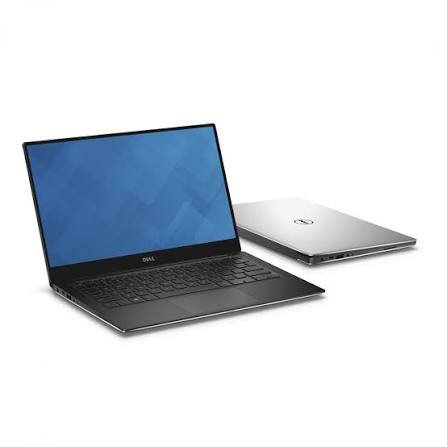
If you’ve been shopping for a premium Windows ultraportable, chances are the Dell XPS 13 9350 has crossed your radar more than once. It’s the name Dell gave to two very different laptops nearly a decade apart the Skylake-era model from 2016, and the 2024 refresh built around Intel’s Lunar Lake chips. That naming overlap trips up a lot of shoppers, so this guide focuses on the machine most people mean today: the modern Dell XPS 13 (9350), powered by Intel Core Ultra 200V processors.
By the end of this article, you’ll know exactly what the XPS 13 9350 gets right, where it falls short, how it compares to workstation-class machines like the Lenovo ThinkPad P1 Gen 6 Mobile Workstation and 2-in-1 hybrids like the ASUS ROG Flow Z13, and whether it deserves a spot in your bag. We’ll also cover real-world battery numbers, display quality, keyboard ergonomics, and pricing, so you can make a confident, informed purchase.
A Quick Word on the Name Confusion
Before diving in, it’s worth clearing something up: Dell has reused the “9350” model number twice. The original XPS 13 9350 launched in late 2015 with 6th-generation Intel Core processors, a 13.3-inch display, and a design that later evolved into the XPS 13 9343’s successor. That machine is now a decade old and firmly a piece of computing history.
The current XPS 13 9350 is a completely different machine. Released in late 2024, it’s the first XPS to use Intel’s Lunar Lake Core Ultra 200V processors, and notably, it’s also the last laptop to carry the XPS name before Dell folded the brand into its simplified “Dell” lineup. This article is about that 2024/2025 model, since that’s what most buyers today are actually researching.
Design and Build Quality
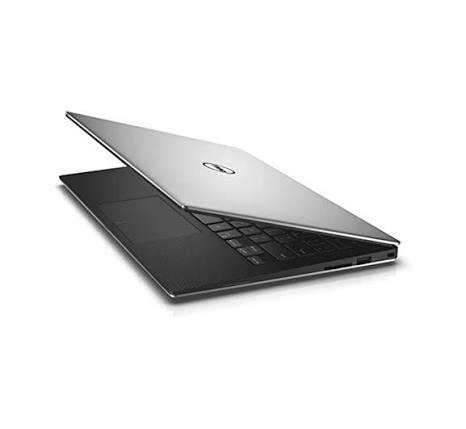
Dell didn’t reinvent the wheel with the 9350’s chassis and that’s mostly a good thing. The laptop measures a mere 0.58 inches thick and weighs about 2.6 pounds, making it one of the most portable 13-inch laptops you can buy. The CNC-machined aluminum chassis feels every bit as premium as its price tag suggests, and the InfinityEdge display bezels remain some of the thinnest in the industry.
That said, the design isn’t universally loved. Dell has kept its “zero-lattice” keyboard, where keys sit flush against one another with no visible gaps, along with a capacitive touch function row instead of physical keys. The new, minimalist design has created something of a divide regarding aesthetics and keyboard usability among reviewers and owners alike.
One of the more polarizing choices is port selection. The XPS 13 9350 features exactly two Thunderbolt 4 ports no USB-A, no HDMI, and no headphone jack. If you rely on wired accessories or external displays, budget for a dock or a USB-C hub, because you will need one.
Display Options: FHD+ vs. OLED
The 9350 ships in two very different screen configurations, and the difference between them matters more than it might on other laptops.
The standard FHD+ IPS panel is serviceable for everyday productivity but won’t wow anyone. Independent lab testing found the non-OLED display covering just 69.9% of the DCI-P3 color gamut, with a Delta-E accuracy of 0.23 numbers that reviewers described as underwhelming for a premium laptop.
Step up to the Tandem OLED option, however, and the story changes dramatically. The OLED panel covered an astounding 144.6% of the DCI-P3 color gamut with a Delta-E accuracy of 0.28, comfortably outperforming rivals like the MacBook Pro 14’s Liquid Retina display and the Asus Zenbook S 14’s OLED panel in color coverage. If you do any photo editing, video work, or simply want punchier visuals for streaming, the OLED upgrade is worth the extra cost.
Performance: How Fast Is It, Really?
The 9350 is built around Intel’s Core Ultra 200V (“Lunar Lake”) chips, which prioritize efficiency over brute-force multi-core speed. In Geekbench 6 testing, one reviewed unit earned a single-core score of 2,660 and a multi-core score of 10,486, landing it just behind similarly configured competitors like the Zenbook S14.
Where the chip shines is in everyday responsiveness and file handling. The same review found the XPS 13 was the fastest of its comparison group in a file transfer test, copying 25GB of files at 1,533.85 MBps. Multi-core-heavy workloads, like video transcoding, expose the chip’s limits a 4K-to-1080p Handbrake transcode took 8 minutes and 35 seconds, noticeably slower than the Snapdragon-powered XPS 13 variant.
The takeaway: this is a laptop built for writing, browsing, video calls, and light creative work not sustained video rendering or heavy compilation jobs. For that kind of workload, you’ll want to look toward workstation-class hardware, which we’ll get to shortly.
Battery Life: The 9350’s Best Feature
If there’s one area where the XPS 13 9350 truly excels, it’s battery life and this is largely thanks to the Lunar Lake platform’s efficiency gains. Dell has finally beaten the MacBook Air in battery life on the FHD+ model, achieving 16 hours and 38 minutes of continuous video playback in one test, enough for two full workdays away from an outlet.
The OLED model trades some of that endurance for its superior screen. Expect closer to 8 to 10 hours on the OLED configuration still a full workday, just not the marathon runtime of the FHD+ version.
Webcam, Security, and Everyday Features
The 9350 includes a 1080p webcam alongside an infrared camera for Windows Hello facial recognition, plus a fingerprint reader built into the power button. The 1080p webcam performs well in good lighting and is color accurate, even if it’s not the sharpest camera on the market, and testers found the IR camera for Windows Hello swift and reliable in daily use.
As a certified Copilot+ PC, the 9350 also includes a capable neural processing unit. The NPU delivers 45 tera operations per second (TOPS), exceeding the 40 TOPS Copilot+ PC requirement, enabling on-device AI features like Windows Studio Effects for background blur and webcam framing.
Pricing: What You’ll Actually Pay
Dell offers the 9350 across a range of configurations. The base model, with a Core Ultra 7 256V processor, 16GB of RAM, a 512GB SSD, and a 13.3-inch FHD+ display, starts at around $1,400. At the top end, a configuration with a Core Ultra 7 258V chip, 32GB of RAM, a 1TB SSD, and the 2.8K OLED display runs about $2,000.
That’s a premium price point, and competing options like the HP OmniBook Ultra Flip 14 sometimes undercut it for similar hardware. Dell does regularly discount the XPS line, so it’s worth watching for sales before committing to a purchase.
How It Compares: XPS 13 9350 vs. Workstation and Hybrid Alternatives
Not everyone shopping for a premium laptop needs the same thing from it. Here’s how the XPS 13 9350 stacks up against two very different machines.
Dell XPS 13 9350 vs. Lenovo ThinkPad P1 Gen 6 Mobile Workstation
These two laptops aren’t really direct competitors they’re built for different jobs, and that’s the point of comparing them. The XPS 13 9350 is an ultra-thin consumer productivity laptop, while the Lenovo ThinkPad P1 Gen 6 Mobile Workstation is built for professionals running CAD software, 3D rendering, or other GPU-intensive workloads. The ThinkPad P1 Gen 6 packs a 13th-generation Intel Core i7 or i9 H-class CPU with available Intel vPro Enterprise remote management, and its graphics options range from consumer-grade GeForce cards up to the professional RTX 5000 Ada Generation.
Storage and memory headroom is another differentiator: the ThinkPad P1 Gen 6 supports up to 96GB of RAM across two SODIMM slots, far beyond what the XPS 13 offers, though it also weighs and costs considerably more. If your workload involves CAD, engineering simulations, or professional 3D content creation, the ThinkPad P1 Gen 6 is the better tool. If you just want a light, all-day writing and browsing companion, the XPS 13 9350 wins on portability.
Dell XPS 13 9350 vs. ASUS ROG Flow Z13
The ASUS ROG Flow Z13 occupies yet another niche entirely: it’s a 2-in-1 gaming tablet rather than a traditional laptop. The latest Flow Z13 is built around AMD’s Ryzen AI Max processors with Radeon 8060S graphics, featuring 16 high-performance Zen 5 CPU cores and 40 compute units of RDNA 3.5 graphics on the same chip, giving it far more graphical horsepower than the XPS 13’s integrated graphics.
The Flow Z13 also detaches into a full tablet, complete with a 13-inch 2.5K touchscreen at up to 180Hz with 500 nits of brightness and 100% DCI-P3 color coverage. It’s a fascinating device for gamers and creators who want console-like gaming performance in an ultraportable shell, but it isn’t designed to compete with the XPS 13 on all-day productivity battery life or keyboard ergonomics for extended typing sessions.
Pros and Cons
Pros:
- Exceptional battery life on the FHD+ configuration
- Genuinely premium, ultra-thin aluminum build
- Vibrant, color-accurate Tandem OLED display option
- Fast file transfer performance and efficient Lunar Lake chip
- Reliable Windows Hello facial recognition and fingerprint security
Cons:
- Only two Thunderbolt 4 ports no USB-A, HDMI, or headphone jack
- Zero-lattice keyboard takes getting used to and increases mistyping
- Base FHD+ display has mediocre color accuracy
- Multi-core performance lags behind Arm-based and AMD alternatives
- Premium pricing, especially on higher-end configurations
Frequently Asked Questions
Is the Dell XPS 13 9350 the same as the 2016 model with the same name? No. Dell reused the model number. The 2024/2025 XPS 13 9350 uses Intel Core Ultra 200V “Lunar Lake” processors, while the original 9350 from 2015–2016 used 6th-generation Intel Core “Skylake” chips.
Does the Dell XPS 13 9350 have good battery life? Yes, particularly on the FHD+ model, which reviewers clocked at over 16 hours of continuous video playback some of the best battery life in its class.
Should I get the OLED or FHD+ display? Choose OLED if color accuracy and vibrant visuals matter to you, since it dramatically outperforms the FHD+ panel in color gamut coverage. Choose FHD+ if maximum battery life is your top priority.
Is the XPS 13 9350 good for gaming or video editing? Not really. Its integrated graphics and efficiency-focused chip are built for productivity, not sustained rendering or gaming workloads. For those tasks, a workstation laptop like the Lenovo ThinkPad P1 Gen 6 or a hybrid like the ASUS ROG Flow Z13 is a better fit.
Is the Dell XPS 13 9350 still available to buy? Yes, though it’s worth noting Dell has since retired the “XPS” branding for newer laptops, so the 9350 represents one of the last models to carry the XPS name.
Conclusion
The Dell XPS 13 9350 delivers on what the XPS line has always promised: a beautifully built, ultra-portable laptop with strong battery life and a display option that can genuinely compete with the best in the business. Its quirks the flush keyboard, the minimal port selection, and the mediocre base display are real trade-offs, but they haven’t stopped it from being one of the most compelling 13-inch Windows laptops available today.
If your priorities lean toward heavy compute or professional 3D work, the Lenovo ThinkPad P1 Gen 6 Mobile Workstation is the smarter buy. If you want gaming performance in a tablet form factor, the ASUS ROG Flow Z13 is worth a look. But for everyday portability, all-day battery life, and a premium feel in your bag, the XPS 13 9350 remains a strong contender as, fittingly, one final send-off for the XPS name.
Did this review help you decide on your next laptop? Drop a comment below with your current setup, share this article with a friend who’s laptop shopping, and subscribe for more in-depth tech comparisons before you buy.
